

 Add Us On Google

Imagine you’re texting your boss or a high-value client: “We CAN’T meet your deadline requirements.”
You hit send.
Only to realize much later that you intended “can” and autocorrect quietly changed it to “can’t.”
One invisible error. Massive consequences.
That’s exactly how construction errors happen without MEP BIM automation. Small coordination mistakes go unnoticed in drawings and models, until they surface on site where the damage is expensive, public, and irreversible.
You can recall a text message. You can’t relocate a chilled water riser that’s boxing in the plumbing vent stack after both trades have already fabricated their spools.
Why do these coordination disasters happen? Because MEP systems create a perfect storm of complexity.
Direct Answer: Does MEP BIM Coordination Automation Actually Reduce Construction Errors?
Yes. Automation runs continuous clash detection, enforces code rules automatically, and flags constructability issues during design—not on-site. Companies report 60-70% faster reviews and rework costs dropping from 8-10% to under 5%. It’s happening on projects now.
Understanding Mechanical Electrical Plumbing BIM challenges
MEP systems are constantly interacting as they run through the building. They all want the same ceiling and shaft space, and many of them need very specific clearances or proximities to function safely and efficiently. That’s where coordination becomes difficult.
Mechanical systems
Mechanical services usually take up the most space in a building. This includes HVAC ductwork, air handling units, diffusers, dampers, and the piping networks used for heating and cooling. The main coordination challenge is simple but unforgiving. These systems need large, continuous zones, while still allowing enough clearance for installation, maintenance, and future upgrades.
Electrical systems
Electrical systems create a different kind of complexity. Power distribution, lighting, telecom, security, and building automation all rely on long, dense distribution networks. Coordination here is less about volume and more about rules. Cables and conduits must stay clear of water-carrying pipes, equipment needs proper working clearances, and cable trays require consistent support.
Plumbing systems
Plumbing systems are constrained by physics. Gravity dictates how drainage lines slope, which limits routing flexibility. At the same time, valves, cleanouts, and equipment still need to be accessible for maintenance. Coordinating plumbing means balancing slope requirements with tight spatial conditions, without blocking access or forcing awkward workarounds later.
Every coordination challenge has a price tag attached.
The Real Cost of “Small” MEP Coordination Errors
Did you know: Miscommunication causes 26% of all rework while bad data or inaccurate information causes 14-22%
MEP design has never been simple. With mechanical, electrical, and plumbing systems tightly interlinked, even a small change in one discipline can ripple across the entire building. That puts MEP engineers under constant pressure to deliver systems that perform as intended, stay within budget, can actually be built, and meet sustainability targets. All at the same time.
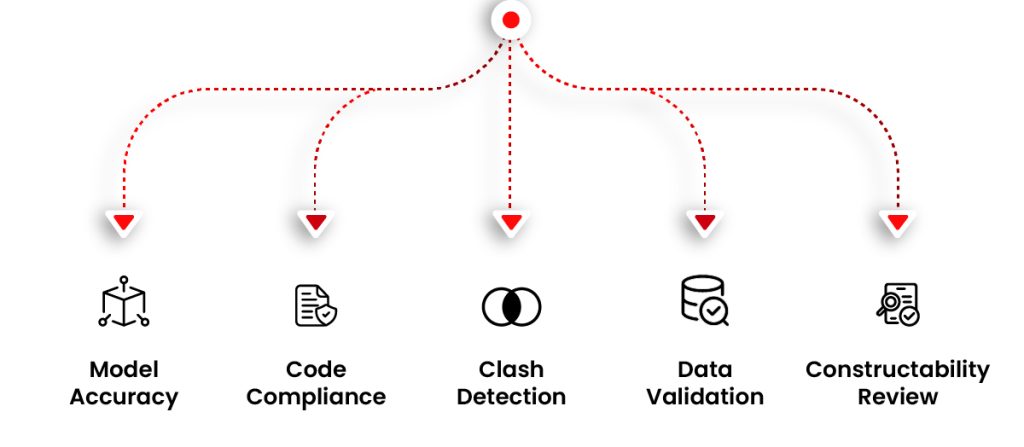
By moving design into a shared, data-rich 3D environment, BIM gives consultants a far clearer view of how building systems interact.
Automation with BIM pushes this further. By applying algorithms and data analytics to the model, it enables multi-dimensional design validation across time, cost, constructability, and performance. The result is a level of precision and consistency in design checks that manual reviews simply cannot match.
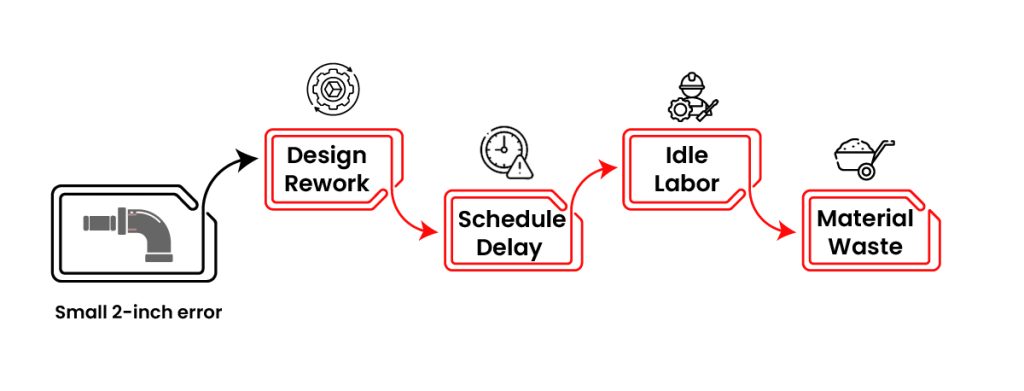
Let’s talk about what a “small” 2-inch pipe offset actually costs you.
Design time to fix: Your MEP engineer needs 4-6 hours to reroute, update drawings, and resubmit.
Schedule delays: The rework pushes your plumber back two days while they wait for revised spools. Your electrician, who was scheduled next, now sits idle or gets reassigned. You’ve just lost a week of sequencing.
Labor costs on-site: Demobilization, remobilization, material waste, and overtime to make up lost time. A 2-inch error can easily balloon into $15,000-$25,000 in direct costs.
The hidden cost: Your superintendent’s credibility with subs takes a hit. Clients remember the projects that went smoothly—and the ones that didn’t.
INDUSTRY REALITY CHECK “Up to 70% of total rework in construction results from design-induced errors-the kind that could have been caught in the model.”
Autodesk Construction Industry Report, 2025
A significant portion of these coordination failures are preventable.
How MEP BIM Automation Changes the Game with construction error reductions
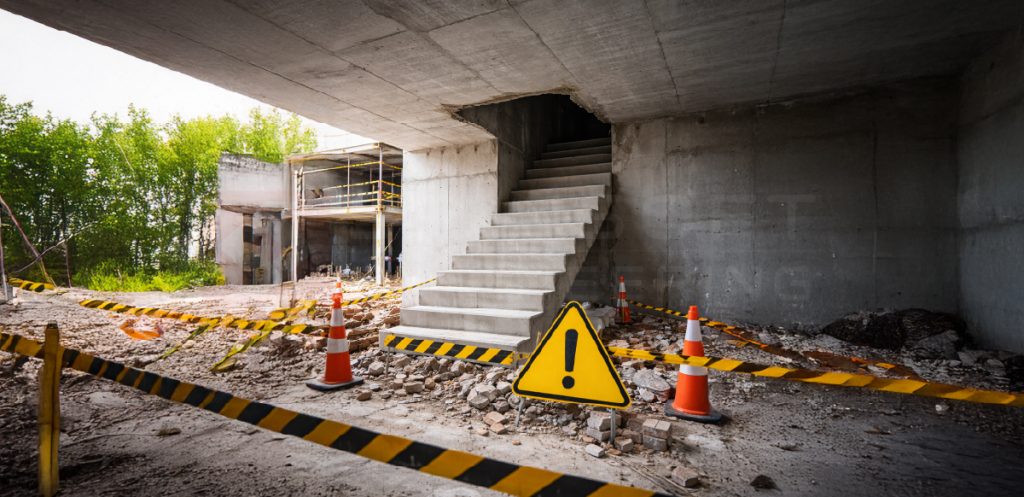
MEP BIM automation doesn’t just speed up coordination. It fundamentally changes how you catch and prevent errors before they become expensive problems.
BIM clash detection automation that actually works
Modern construction clash detection tools run clash detection continuously in the background, flagging conflicts the moment they’re introduced. Intelligent filtering separates hard clashes (a pipe physically intersecting a beam) from soft clashes (a valve that needs maintenance clearance), cutting review time by 60-70%.
Rule-based design validation
You set the rules once—minimum clearances for electrical panels, required access space for HVAC equipment, fire separation distances—and the software enforces them automatically as the model develops. Beyond in-built code compliance, automated data validation ensures every component carries complete, accurate metadata—from equipment specifications to manufacturer details to installation requirements. This ensures your model isn’t just visually correct but data-rich and construction-ready.
Automated routing optimization
Instead of manually testing multiple duct or pipe routes, automation evaluates feasible routing options based on predefined constraints. It highlights conflict-free alternatives and flags trade-offs, allowing the BIM coordinator to make faster, better-informed decisions.
Change management that doesn’t break everything
When the architect moves a wall (and they always do), automated systems immediately analyze downstream impacts. Which ductwork needs rerouting? Which equipment relocations trigger code violations? Coordinators can then review, validate, and approve updates instead of manually hunting for broken connections.
But it goes deeper—automated constructability reviews assess whether your design is actually buildable. Can the installer physically reach that connection point? Is there adequate space for equipment rigging? Does the installation sequence make sense?
Automation doesn’t replace coordination decisions. It removes the manual grunt work that hides coordination risks until it’s too late
Here are 4 examples of how automation translates to measurable business value, with examples from real projects.
The Numbers BIM Managers Can Take to Leadership
- Energy Performance Optimization
Example:
On a large office building, HVAC loads are traditionally oversized “to be safe.” Automated BIM simulations show actual peak loads are 18 percent lower than assumed. Chillers and AHUs are downsized before procurement.
What leadership gets:
Lower capex on equipment, reduced energy bills for the next 20 years, fewer complaints about overcooling or short cycling. - EnergyReducing Material Waste
Example:
In a hospital ceiling zone, electrical conduits, chilled water pipes, and medical gas lines are routed independently in 2D. BIM coordination identifies shared corridors and optimal routing. Cable tray lengths drop. Pipe bends reduce.
What leadership gets:
Less copper, less steel, fewer fittings, faster installation. Material savings show up directly in BOQs and procurement spend. - Cost savings in construction
Example:
On a data center project, automated clash detection flags hundreds of HVAC–structural clashes during design. These would have caused slab coring and rework during construction.
What leadership gets:
Avoided rework costs, avoided schedule delays, no emergency change orders. Predictable budgets instead of damage control meetings. - Foundation for Predictive Maintenance
Example:
A commercial campus links BIM asset data with IoT sensors in the building management system. Pumps and chillers show vibration and temperature trends tied to exact model locations.
What leadership gets:
Maintenance shifts from reactive to predictive. Fewer breakdowns. Longer asset life. Lower OPEX.
Now If you are saying, “We can’t afford to disrupt our current projects to implement this.” You don’t have to.
Getting Started Without Overhauling Everything
You don’t need to flip a switch and automate your entire MEP workflow overnight. Start strategic.
Begin with your high-risk zones (mechanical rooms, vertical shafts, congested ceiling plenums) where coordination errors hit hardest. These areas typically account for 70% of your clashes anyway. Pilot automation on one discipline first. Maybe mechanical coordination, since HVAC routing often drives everything else. Get your team comfortable with the tools, refine your processes, then expand to electrical and plumbing.
Modern automation tools integrate directly with your existing Revit workflow. Your team keeps working in familiar software while automation handles the heavy lifting of clash detection, rule checking, and validation in the background.
Small steps. Big impact. That’s how you build momentum without disrupting active projects.
BIM MEP Services
Stop Paying for Errors You Could Have Prevented
The construction industry is moving toward zero-clash delivery. Owners expect it. Competitors are already there.
SrinSoft Engineering helps BIM managers and GCs cut rework costs by an average of 40% through intelligent MEP BIM automation—without disrupting your current workflow or requiring a complete system overhaul.
[Schedule a 15-Minute Demo for our MEP BIM services]
TL;DR
MEP coordination errors cost 5-8% of project budgets. Automation catches clashes continuously, enforces code compliance automatically, and prevents design mistakes before construction. Start with high-risk zones, pilot one discipline, integrate with existing Revit workflows. Catch errors in the model, not on the jobsite.
1. Does MEP BIM automation actually reduce rework or is it just clash reports?
It reduces rework when teams act on the output. Automation finds clashes earlier and more consistently than humans, but it does not resolve them by itself. Rework drops because fewer errors reach site, not because clashes disappear automatically.
2. What coordination issues automation still misses in MEP models?
Automation struggles with intent-based issues. Installation sequence conflicts, trade preferences, temporary works, and constructability based on crew experience still need human judgment. If something is not rule-based or modeled accurately, automation will not catch it.
3. Architect moved walls late; how does BIM automation handle this?
Automation flags impacted ducts, pipes, and clearances immediately. It does not magically redesign everything. Coordinators still decide rerouting strategies, but they no longer waste time manually searching the model to understand what broke.
4. Can we set our own clearance and constructability rules in BIM automation tools?
Yes, most serious tools allow project-specific rules. Clearances, access zones, equipment maintenance space, and internal standards can be encoded. The limitation is rule quality. Bad or incomplete rules produce bad results, just faster.
5. How much rework cost reduction GCs are seeing with MEP BIM automation?
On disciplined projects, GCs typically see 30–50% reduction in MEP-related rework. On poorly managed projects, gains are lower. Automation amplifies good coordination practices. It does not fix broken workflows or late decision-making.