
 Add Us On Google

What if you could recreate the Amazon rainforest?
We can’t. But we can digitally reverse engineer a refinery built even before CAD existed.
Decades of shutdown fixes. Vendor swaps. Rerouted lines. Reinforced frames.
The plant evolved. The drawings didn’t.
Yet, retrofit models still rely on those ghost schematics.
This is where Scan-to-BIM shifts from a marketing buzzword to an operational necessity. The real challenge is keeping that truth intact across fragmented platforms.
In brownfield work, coordination isn’t just about finding clashes—it’s about controlling the data before the shutdown clock starts ticking.
SCAN-TO-BIM: The Reverse Engineering Mindset
Scan-to-BIM isn’t a deliverable. It’s a diagnostic audit of a plant’s institutional memory against its physical reality. Most brownfield assets suffer from data decay; the “as-built” is often a record of intent, while the point cloud is a map of deviation.
Treating the scan as a backdrop for tracing legacy drawings is fundamentally backwards. When you start with 2D schematics and “verify” with a scan, you subconsciously bias the model toward outdated assumptions. The reverse engineering mindset flips this: the cloud is the only truth, and the drawings are the suspects.
Design from the scan. The point cloud defines the actual geometry of the plant. Legacy drawings should only provide context, system logic, and historical intent, not the physical dimensions used to build the model.
Data Alignment Before Model Alignment
The most expensive clash in a brownfield retrofit isn’t between the pipe and the beam. It’s between two teams operating on different versions of truth.
Coordination failures usually precede the model. By the time a clash appears in Navisworks, the root cause is already weeks old.
The first place that breaks is the Coordinate Reference System (CRS). Treating the CRS as a survey formality rather than a rigid discipline is a recipe for drift. It’s a collaboration tool. When disciplines set up their models independently and reconcile later, you get a collision of isolated ones. CRS needs to be locked, shared, and enforced before the first scan registration.
Platform fragmentation compounds this. Revit, Plant 3D, AVEVA, and Navisworks don’t share a common data language — they share an approximation of one. Each translation introduces drift: parameter loss, geometry simplification, classification gaps. The result? Clash detection runs against a model that no longer reflects live design decisions — and the output is confidently wrong.
Clash Detection That Actually Means Something
Most clash reports are 400 pages of noise. BIM managers know this because they’ve watched site teams dismiss them wholesale — and sometimes they’re right to.
The real skill is clash triage: the aggressive separation of construction interference from model slop.
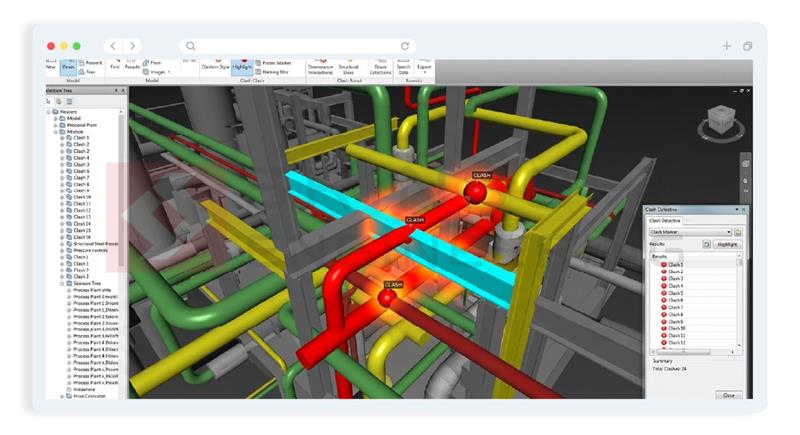
Three categories are worth distinguishing. Hard clashes — geometric intersections — are the ones most tools surface first and most teams fixate on. Soft clashes are where brownfield projects actually fail in the field: clearance violations, maintenance envelopes, insulation buffers. Nobody allocated space for what the drawing called a 2-inch line that’s now insulated to 8 inches — and no tolerance configuration catches that if it was inherited from a greenfield template. Running 0mm clearance checks on a plant built to ±25mm fabrication variance doesn’t produce insight. It erodes trust in the model. Tolerance rules need to be set by someone who has been on that plant, not copied from the last project.
Clash detection tools catch geometric conflicts in the model. The bigger risk during shutdowns comes from workflow conflicts such as sequencing, access, and installation dependencies.
A workflow clash exists when two disciplines that never intersect in the final model compete for the same space during execution.
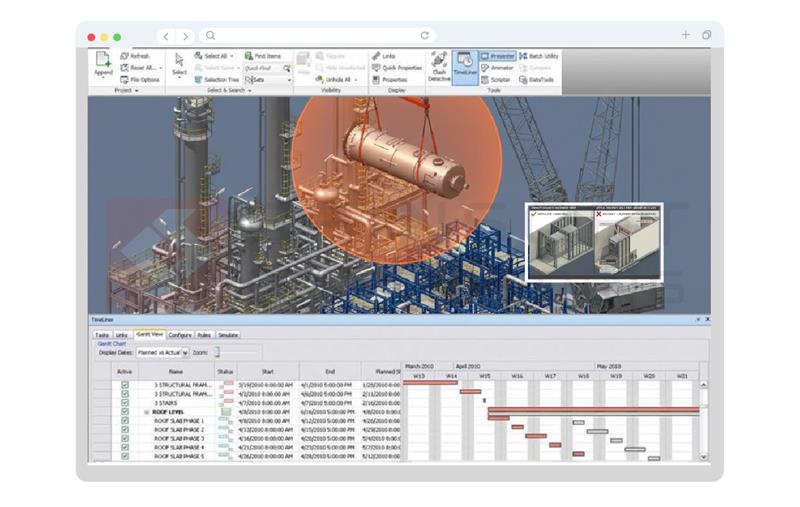
Consider a realistic scenario from a refinery turnaround: a new heat exchanger needs to be lifted and set during the first week of shutdown — critical path, crane already scheduled. Meanwhile, the piping discipline has sequenced a high-priority weld repair on an adjacent line, requiring scaffolding that runs directly through the lift envelope. Both tasks are valid. Both are on schedule. Neither team knows the other exists in that space on that day. The exchanger doesn’t move until the scaffold comes down. The scaffold doesn’t come down until the weld passes inspection. The crane sits idle at $4,000 an hour.
No clash report caught it because no clash report was built to catch it. The geometry never intersected. The schedules did.
This is where BIM coordination has to grow past the model. Workflow clashes require overlaying sequencing data — lifts, scaffolds, access routes, crew zones — onto the federated model before execution begins. The output of clash resolution should feed the model. Every resolved clash is a data quality signal — a flag that something in the source model, the scan interpretation, or the design assumption was wrong.
Interoperability Without the Utopia
Practical interoperability in heavy industry means managing translation loss aggressively.
In the brownfield world, IFC is the most common answer and a genuinely useful floor — but only if you know exactly where the floor ends. IFC transfers geometry and spatial relationships reliably. It silently drops the rest: pipe specifications, equipment attributes, material grades, the metadata a refinery shutdown actually runs on. That loss isn’t an IFC failure. It’s a workflow design failure — one that happens when teams assume compliance equals fidelity.
Where metadata integrity is non-negotiable, proprietary formats still win. The decision shouldn’t be ideological. It should be based on a simple question: what survives the export? Map your critical data fields against your translation path before federation begins. Where the answer is “not enough,” that’s where you either lock the native format or introduce a middleware layer capable of enforcing the hard handshake — ensuring pipe specs and equipment orientation don’t get quietly rounded down to geometry.
The unsexy connective tissue of a federated model is the naming conventions and shared parameters. If your structural steel tags don’t survive the export, your model is just a picture. A rigorous model audit trail—knowing who changed a flange rating, when they did it, and if that change survived the export—is the only way to maintain a “current” status across disciplines.
Coordination in the Shutdown Window
When the clock starts, the model either earns its keep or it doesn’t.
Pre-shutdown model freeze is where most teams are too late. Freezing the model when engineering is “complete” sounds logical. In practice, late design changes — the ones that happen in the final two weeks before shutdown — are exactly the ones that introduce undetected clashes. The transition from a “coordination model” to an “execution model” requires a brutal pre-shutdown freeze protocol.
Clash detection sequencing matters for the same reason. Running a full federation clash at model completion finds everything too late to resolve without impacting the schedule. The more effective approach: run targeted discipline-pair clashes aligned to procurement and prefabrication cutoffs. Catch the pipe-structure conflict before the spool is fabricated, not after it arrives on site.
The gap between what’s resolved in Navisworks and what’s communicated to the field remains one of the most consistent failure points in brownfield coordination. Static issue logs — even well-managed ones — don’t reflect resolution velocity during execution.
Live coordination workflows, where field teams can close issues against the model in real time, compress the feedback loop enough to matter on a two-week shutdown schedule.
What Scan-to-BIM Actually Settles
The scan doesn’t solve it. Interoperability standards don’t solve it. Decision quality does — collapsing uncertainty early and keeping data honest under pressure.
The scan is not the answer. It’s the question. What your model does with that reality — how it gets governed, federated, and kept honest under deadline pressure — that’s where coordination either holds or unravels.
If reverse engineering is a governance discipline, it demands partners who treat it that way. That’s where execution capability matters more than software capability.
Running clashes you can’t trust? Models that don’t reflect the field?
SrinSoft Engineering delivers:
- Scan-to-BIM that starts from reality, not drawings
- BIM coordination workflows built around shutdown sequencing
- Clash-free coordination across Revit, Plant 3D, AVEVA, and Navisworks
Talk to the team → srinsoft.engineering
TL; DR
Your drawings don’t reflect the plant. Your clash reports surface symptoms, not root causes.
And your tolerances may not match field reality. Scan-to-BIM establishes a baseline. Governance, disciplined federation, and workflow-aware coordination keep that baseline intact when the shutdown clock starts. If your model cannot survive translation, sequencing, and late-stage revisions, it cannot survive a turnaround.
FAQs
1. Is Scan-to-BIM really necessary for brownfield projects?
Yes, in most brownfield projects. Existing drawings are often outdated, and undocumented modifications make them unreliable. A point cloud captures the facility as it actually exists, reducing design risk and supporting accurate as-built models. It becomes even more critical for older plants and heritage structures where documentation is incomplete.
2. Why do clashes still happen even after Navisworks coordination?
Because most clash detection focuses only on geometry. Workflow sequencing, tolerances, installation access, and translation drift between platforms are rarely modeled properly.
3. What causes model drift between Revit, plant 3d, and AVEVA?
Data translation. Parameter loss, coordinate misalignment, simplified geometry, and inconsistent naming conventions across exports all degrade model fidelity over time.
4. How do you prevent coordinate system issues in BIM projects?
Lock the Coordinate Reference System before scan registration and enforce it across all disciplines. Independent model setups reconciled later almost always introduce drift.
5. What is a workflow clash in BIM?
A workflow clash happens when two disciplines don’t intersect in the final model but require the same space during installation. It’s a sequencing conflict, not a geometric one.