[ Sep
15-17
] Save the date for Autodesk 2026
[ Sep
15-17
] Save the date for Autodesk 2026
 Email:
inquiry@srinsoft.engineering
Email:
inquiry@srinsoft.engineering Phone:
+1 (614) 552-3888
Phone:
+1 (614) 552-3888

 Add Us On Google
Imagine you’re in a time loop, but you don’t reset to zero.
Now imagine project revisions working the same way. In traditional construction workflows, a single structural change forces a ‘reset’—a manual marathon to update every floor plan, section, and schedule. With Design Automation, that cycle is broken. You continue from the last stable version, changes propagate across the entire set automatically, and the manual redraw marathon disappears.
Most articles about 2D design automation and 3D design automation talk about “efficiency gains” and “digital transformation.” Let’s skip the buzzwords and focus on what actually changes in your day-to-day work.
Cost of Inaction in BIM CAD Design Automation
Every project you run without automation, you’re absorbing costs that don’t show up on a line item. The coordination errors that become change orders. The RFIs that could have been prevented with consistent documentation. The list goes on.
Your best people are spending forty hours a week on clerical updates instead of solving actual coordination problems.
Meanwhile, the firms that invested in automation two years ago are winning projects you used to compete for. They’re responding to RFPs faster, their fee proposals are tighter because they know their coordination costs, and their risk profile is lower because they catch conflicts before steel gets ordered.
TL;DR
If moving one wall forces your team to update twenty sheets, your BIM process is broken. Design automation ties drawings, schedules, and tags to a single source, so changes don’t create RFIs, rework, or late-night ire drills. It’s about stopping preventable coordination failures.
What Breaks Without AEC Design Automation in Construction
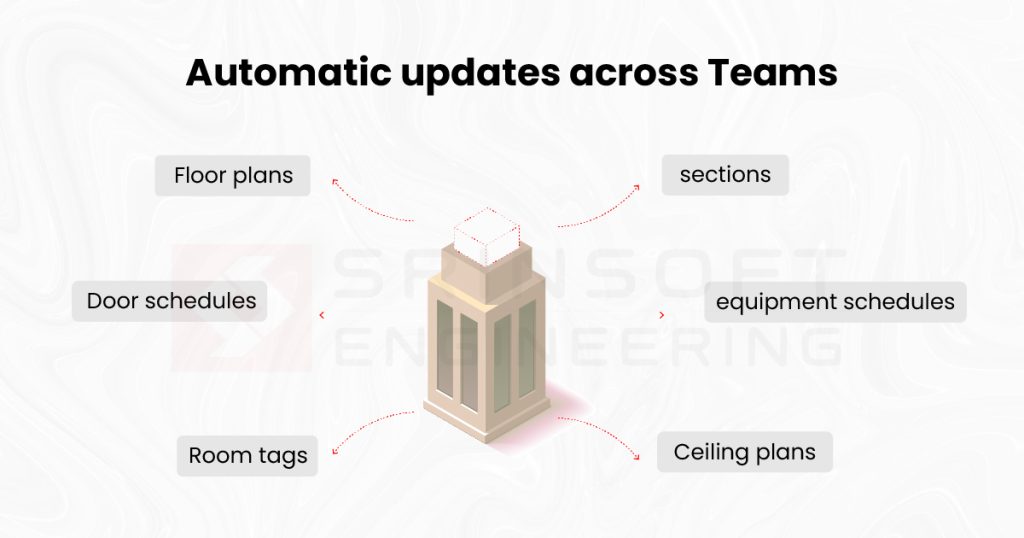
The midnight email lands in your inbox: “Client wants to move the mechanical room 15 feet west.” Your mind immediately starts the calculation. Architectural floor plans need updates. The reflected ceiling plan changes. MEP coordination drawings are now wrong. Every building section that cuts through that area needs revision. Wall sections, door schedules, equipment schedules—they all need attention. You’re looking at updates across maybe twenty sheets, minimum.
But the real cost includes the communication overhead of explaining the same change across six different trade teams, each needing to understand how it affects their scope. And the errors that slip through when you’re manually updating sheets and your brain stops catching the details that matter.
Worst of all, the decision paralysis and handling the stakeholders who treat design changes like radioactive material.
The Three Things BIM CAD Design Automation Actually Fixes
Fix #1: Parametric Dependencies
When that mechanical room moves 15 feet west, parametric automation knows what’s connected. Door tags update to reflect the new room number. Room schedules recalculate square footage without you touching a cell. Section cuts automatically reflect the new wall positions. Equipment schedules maintain their references to the relocated room. The relationships you built into the model do the clerical work while you focus on whether the change actually works.
Reality check: this doesn’t eliminate all manual work. You still need to verify clearances, check that the door swing makes sense in the new layout, and coordinate with MEP about how their routing changes. But you’re spending time on thinking work—the engineering judgment calls that actually require your expertise—instead of manually updating text on forty different sheets.
Fix #2: Consistency Across Documents
You know that sinking feeling when you find a dimension on Sheet A-201 that contradicts the plan on A-101? Someone updated one view and forgot the other. The RFI arrives three weeks later asking which dimension is correct. Design automation reduces this problem because information lives in one place and displays in multiple views. Change the wall location in the model, and every sheet that references that wall updates.
This enables three things that matter: confidence in your coordination process, faster RFI responses because you’re not hunting for which drawing has the “right” answer, and subcontractors who actually trust your documents instead of building contingency into every bid.
Reality check: This only works if your modeling standards are solid. Garbage in, garbage out still applies. If your team is modeling walls as generic boxes instead of actual wall families, or if room boundaries aren’t properly defined, automation won’t save you. But when you’ve built good information into the model, consistency follows automatically.
Also keep in mind that while automation excels with standard geometries, its implementation becomes increasingly intricate when applied to complex modeling or unconventional architectural forms.
Fix #3: Clash Detection
Finding a duct-beam conflict in Navisworks costs you thirty minutes in a coordination meeting. Finding it when the ironworkers are standing around on site waiting for an answer costs you $2,500 in labor and a schedule delay you’ll be explaining in the next owner meeting.
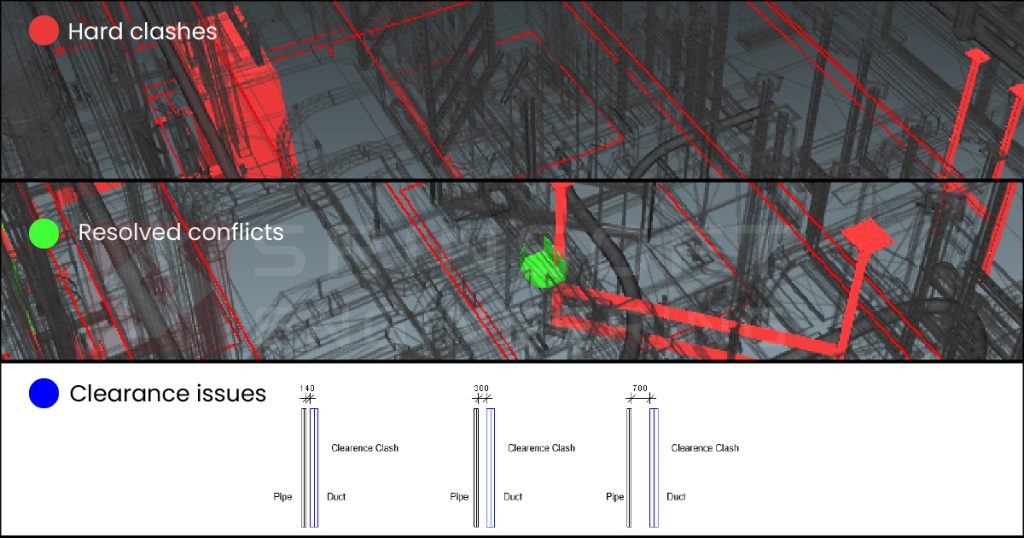
Automated clash detection lets you run checks in the background once you set it up nicely. The software prioritizes conflicts by severity—hard clashes between structural and MEP get flagged differently than clearance issues. You can track resolution status across revisions, so you know exactly which conflicts got fixed and which ones are still open heading into the next coordination meeting.
Reality check: you’ll still have clashes. Automation doesn’t prevent bad design decisions or eliminate the complexity of routing ductwork around structure.
Direct Answer
CAD and design automation replace manual drafting with synchronized workflows. By using parametric dependencies, a single change—like moving a wall—automatically updates all related floor plans, sections, and schedules. This eliminates clerical errors, ensures document consistency, and catches costly structural clashes before they reach the field.
BIM CAD Design Automation – The Implementation Truth
Your team will resist, with reason.
They’ve seen “game-changing” software before. They sat through the last three vendor demos that promised to revolutionize everything, then spent six months fighting with software that didn’t understand how construction actually works.
This is actually valuable—those workarounds exist because your processes have gaps—but it’s painful. You’re not just installing software. You’re doing change management, documenting workflows that have lived in people’s heads for years, and having uncomfortable conversations about why things have always been done a certain way.
But every consultant will admit that the first few projects will be slower. The way to address this is simple but requires patience. Start with one project type—tenant improvements work well because they’re contained and repetitive. Prove the value on something manageable before rolling it out enterprise-wide. Let your team see the benefit on a project that won’t sink the company if the learning curve takes longer than expected.
The ROI doesn’t show up where you expect
You won’t necessarily complete projects faster. Permitting timelines exist. Procurement still takes time. The construction schedule is still driven by concrete curing and long-lead equipment deliveries.
Where you will see benefits: fewer RFIs driven by conflicting documentation, because your drawings are actually coordinated. Faster response time to design changes late in the process, when the owner decides they want that wall moved after all. Reduced liability from coordination errors that would have turned into change orders. More time for your BIM team to do analysis and solve actual problems instead of spending their days updating sheet indexes.
You need someone who actually understands both the tools AND construction
The winning combination is a BIM manager who’s spent time in the field and understands why details matter, combined with the patience to build templates and standards that match how your teams actually work.
Why SrinSoft?
Design automation will not make your projects exciting. It will make them predictable. Firms that implement it correctly reduce revision-driven RFIs, shorten late-stage design response time, and stop burning senior BIM staff on clerical updates.
SrinSoft Engineering, with their 3D BIM modeling services and BIM drafting services, helps BIM teams build automation that reflects how construction actually works. Not demo workflows. Not generic templates. Real standards tied to real coordination problems. Clients typically see fewer documentation conflicts and faster turnaround on late owner changes within the first few projects.
If your team is still redrawing sheets after every design change, the problem is not effort. It’s the workflow. Talk to SrinSoft Design Automation Services team about bringing stability and consistency back into your revision cycles.
1. How do we stop updating 20 sheets every time the client moves one wall
You stop treating drawings as independent files. You model the wall once, with parametric relationships. Plans, sections, schedules, tags, and quantities reference that single source. Move the wall, everything updates.
2. Is design automation actually worth it or is it just another Revit headache
It’s worth it only if you invest in standards and workflows. If you expect automation to fix sloppy modeling, it will fail. Firms that say “it didn’t work” usually skipped template development, naming rules, and training.
3. What parts of CAD and BIM drafting can realistically be automated today?
Anything repetitive and rules-based. Sheet creation, view placement, tagging, schedules, dimension propagation, revision updates, clash checks, and quantity extraction.
4. How do parametric changes prevent RFIs and site clashes in real projects
RFIs explode when drawings contradict each other. Parametric models eliminate duplicate information. When a wall moves, every dependent view reflects the same truth. Clash detection then runs on consistent geometry.
5. How do firms implement design automation without slowing projects for six months?
They don’t roll it out everywhere. They pilot it on one repeatable project type. Tenant improvements. Typical floors. Standard plant rooms. They accept short-term slowdown to eliminate long-term rework.