[ Sep
15-17
] Save the date for Autodesk 2026
[ Sep
15-17
] Save the date for Autodesk 2026
 Email:
inquiry@srinsoft.engineering
Email:
inquiry@srinsoft.engineering Phone:
+1 (614) 552-3888
Phone:
+1 (614) 552-3888

 Add Us On Google

Think of BIM dimensions like a stalk of bamboo.
Bamboo can hold many times its own weight. It bends in typhoons without snapping. Cut it open, and it’s mostly hollow. The strength isn’t in the walls. It’s in the nodes. The internal joints that interrupt the hollow sections and stop collapse under compression.
Most 3D models are the opposite. All wall. No nodes.
They look solid from the outside. Clash-free. Coordinated. But when you try to use them for real decisions. Sequencing (4D). Cost updates (5D). Performance tracking (6D). The cracks show.
Why. Because no one built the internal structure. No time logic. No cost intelligence. No handover data. The model becomes dead weight the moment construction ends.
In practice, BIM dimensions decide whether the model drives decisions or just documents them.
Did You Know: BIM dimensions extend 3D geometry with time (4D), cost (5D), performance (6D), and operations data (7D). Each dimension depends on the one below it. Most GCs stop at 3D clash detection, but real value comes when the model supports actual construction decisions—sequencing, cost updates, and handover—not just documentation.
TL;DR:
Most BIM models are hollow—clash-free geometry with no internal structure. 4D adds schedule logic. 5D links live costs. 6D tracks performance. 7D enables handover. Each dimension builds on the last. Skip the foundation, and everything above it fails. Build it right, or the model becomes dead weight after construction.
The Real Question BIM Managers Are Asked about BIM Dimensions
“What do we actually get if we go beyond 3D?”
It’s the question every BIM Manager hears from project executives who’ve been burned before. And it’s fair. Because when most GCs say, “we already do BIM,” they mean they run clash detection. Maybe they color-code disciplines in Navisworks. That’s 3D BIM coordination. Not true MEP BIM coordination
The problem is that geometry only answers one question: Does it fit?
It doesn’t answer:
- Can we build it in the sequence the schedule requires? (4D)
- What does it actually cost, and does that number update when the design changes? (5D)
- Will this equipment data survive handover? (6D/7D)
They’re the pressure points that cost GCs money.
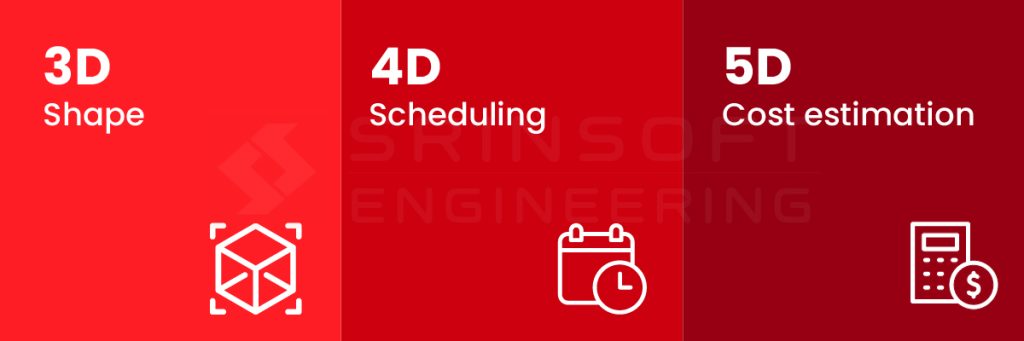
3D geometry is the foundation; we’re assuming that’s already coordinated. The real differentiation starts at 4D
4D BIM: Time
4D BIM links model elements to real construction activities so the model reflects how the project will actually be built. Walls, slabs, ducts, and steel are tied to tasks, sequences, and handoffs between trades.
This is where GCs see immediate value. Before mobilization, 4D exposes sequencing problems that look fine on a Gantt chart but fail in the field. It highlights impossible overlaps, unsafe access conditions, and trade clashes that reports miss.
4D also changes how plans are communicated. Field teams understand a time-based model faster than PDFs or schedules, reducing interpretation errors and coordination friction.
Why 4D alone not enough?
Schedules are created separately from the model. The model isn’t set up to match construction activities. When changes happen, the connection between design and schedule breaks.
The GC litmus test is simple. Can we re-sequence the work without rebuilding the model? If not, it’s not real 4D.
5D BIM: Cost
What changes when cost lives in the model:
Real 5D means quantities update automatically when geometry changes. An architect swaps 8-inch CMU for 6-inch, and the cost estimate reflects it instantly. When MEP reroutes a duct to avoid a beam, the quantities update automatically instead of someone manually recounting lengths in Bluebeam.
Early visibility matters more than final accuracy. Knowing a design decision adds $47K while you can still change it is more valuable than a perfect estimate delivered after the decision is locked.
What usually goes wrong with 5D:
Cost data usually gets added after the model is done, not built into it from day one. The model calls something “Duct Type A.” The estimator calls the same thing “12×8 supply duct.” They’re talking about the same thing, but the systems don’t know that.
So nothing connects. By the time the mismatch is noticed, decisions are already made and budgets are already committed.
6D BIM: Performance
On real projects, 6D BIM is about understanding how the building will actually perform once it’s in use. Energy consumption, operational efficiency, and long-term maintenance costs are tied back to the model early.
This matters to GCs because owner expectations no longer stop at handover.
The common mistake is treating 6D as a consultant-only exercise. When performance data lives outside the construction workflow, assumptions go unchecked and risks surface too late. GCs who engage with 6D early are better positioned to manage expectations, control risk, and avoid last-minute surprises.
Example: On one project, a GC realized late in the job that the mechanical systems wouldn’t meet the owner’s energy expectations. The model geometry was correct, but performance was never checked until handover preparation. By then, options were limited and fixes were expensive. That’s a 6D failure showing up as schedule and cost pressure.
6D focuses on how the building performs. 7D focuses on how it is operated.
7D BIM: Handover
7D BIM is where most projects are judged long after construction ends. Owners want maintainable assets, reliable information, and data they can actually use to run the building. That means structured asset data, such as equipment tags that match the owner’s CMMS system.
This is where GCs often struggle. Facility management requirements are defined late, if at all. Asset data gets added in a rush, never properly checked, and handed over as a model instead of usable information. From the owner’s side, the model becomes something they can’t trust or don’t know how to use.
The BIM manager plays a critical role here. Handover requirements need to be defined early, not at project closeout. More importantly, data completeness has to be enforced throughout the project.
Where 8D Fits (And Where It Doesn’t)
8D BIM is often used as a catch-all for what comes beyond operations. In practice, it usually covers safety planning, risk intelligence, or lifecycle and end-of-life considerations. On some projects, it can support safer sequencing, better risk visibility, or smarter decommissioning decisions.
The reality check? There is no universal definition of 8D. Different teams mean different things, and many projects label anything “extra” as 8D without a clear purpose.
That’s where teams get into trouble. Chasing 8D for maturity points adds complexity without value.
The rule is simple. If there isn’t a clear owner-driven use case, don’t pursue 8D. Focus on making 3D through 7D reliable first.

Dimensions Are Dependencies
BIM dimensions are often misunderstood as a maturity ladder. Finish 3D, move to 4D, then add 5D later. That thinking causes most downstream failures. In reality, each dimension depends directly on the quality and structure of the one beneath it.
Time data is only reliable if the model elements are consistent and complete. Cost data only works if quantities and classifications are stable. Performance and operations data only add value when the underlying information can be trusted.
These dimensions compound. That’s why skipping ahead creates false confidence. The model may look sophisticated, but it can’t support real decisions.
The goal is to build a model reliable enough to carry more responsibility.
Practical Adoption
Start with one question. What decision do we want the model to support on this project? Sequencing. Cost validation. Handover data. If there’s no clear decision, don’t add another “dimension”.
Next, clean up the basics. Align naming, parameters, and levels of detail across all trades. If architectural, structural, and MEP models describe the same element differently, fix that first. Nothing else will work until this does.
Then test one use case in a controlled way. Pick one area of the building and one milestone. Use 4D to validate sequencing or 5D to check cost impact. Make changes and see if the model survives them.
Finally, enforce discipline early. Check data completeness at each stage, not at the end. If the model can’t be trusted week to week, it won’t be trusted at handover.

SrinSoft
The difference between BIM that looks good and BIM that works comes down to execution discipline. Most firms know what the dimensions mean. Few can deliver models that actually survive construction changes and handover requirements.
Srinsoft Engineering builds that discipline in from day one—4D through 7D coordination that supports real decisions, not just documentation.
Ready to stop patching hollow geometry? Schedule a consultation for BIM coordination services.
1. How do I convince my project manager that 4D BIM is worth the time?
Don’t pitch theory. Show sequencing conflicts a Gantt chart misses. Use one zone to visualize trade overlaps, access issues, or resequencing. When field teams understand the plan faster and RFIs drop, the value becomes obvious.
2. Our 5D quantities don’t match estimator numbers, why?
Because the model and the cost database don’t speak the same language. The model says “Duct Type A.” The estimate says “12×8 supply duct.” Same thing. Different naming. Until those are aligned, nothing will reconcile automatically.
3. Can we add 4D schedule links to existing Revit model or start over?
It depends. If model elements map cleanly to construction activities, you can add links. Test one zone first. If grouping and naming don’t align, rebuilding later will cost more than fixing it early.
4. What software do general contractors actually use for 5D BIM cost?
Common setups include Navisworks with Assemble, Vico, or CostX. Tools help. Bad model structure still breaks everything.
5. Owner wants COBie data at handover, what do I actually need to give them?
Asset tags that match their CMMS. Equipment data. Warranty details. Maintenance schedules tied to real model elements. Define this early. If you wait until closeout, it turns into a scramble.