
 Add Us On Google
Just as a spotlight illuminates the solo performer on stage, Structural BIM highlights the building’s backbone early – exposing risks, refining designs, and tightening coordination before construction begins.
Did you know? In 2021, results from a cost-benefit analysis (CBA) from the European Commission revealed that the cost of BIM implementation constituted approximately 0.8% of total construction costs, while the ROI exceeded 320% for office buildings and 240% for residential buildings.
What is structural BIM and why it matters now
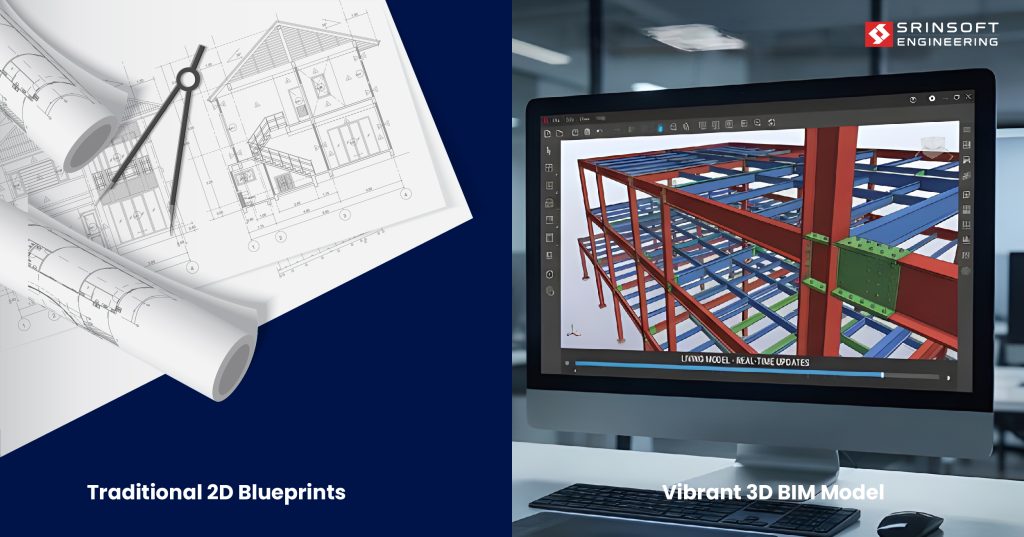
Think of Structural BIM as moving from static blueprints to living, intelligent models. Instead of lines on a page, you’re working with 3D elements that know what they are—a W12x26 beam understands its material properties, load capacity, and how it connects to adjacent members.
The difference matters because these models can answer questions traditional drawings can’t: “What happens if we swap this concrete column for steel?” or “Show me every conflict between structural framing and ductwork above the third floor.”
This intelligence flows through your entire structural BIM workflow. When your structural engineer updates the beam size in their analysis software, that change can update the BIM model, which automatically adjusts fabrication drawings and material schedules.
A well-built structural BIM model gives you:
- Reliable geometry for MEP routing, façade interfacing, and load-path validation
- LOD-consistent elements that actually support downstream trades
- Connected data for QTO, scheduling, RFIs, and constructability analysis
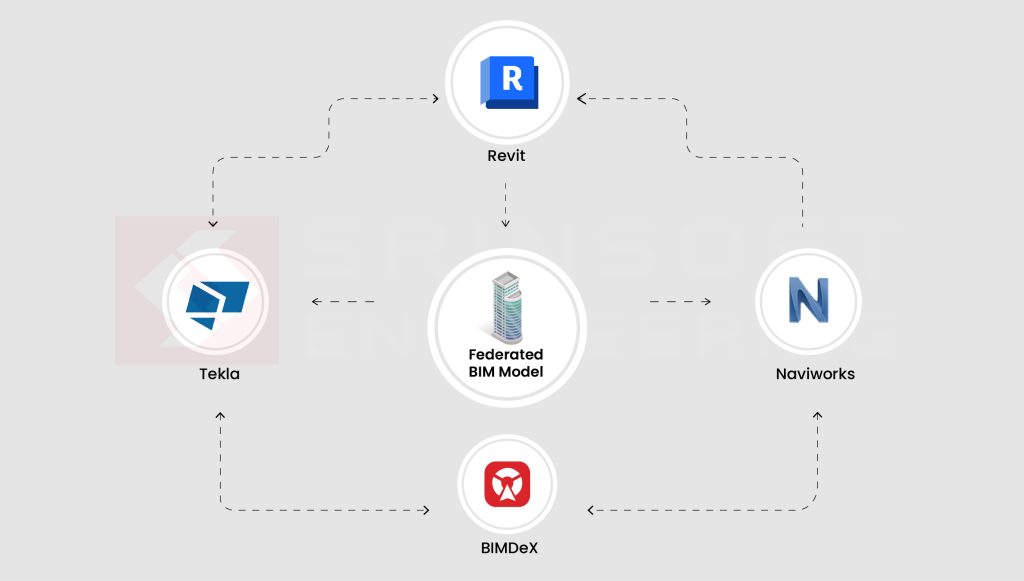
- Interoperability with Tekla, Revit, Navisworks, and fabrication platforms
- Predictive insights when paired with AI-based model checking tools
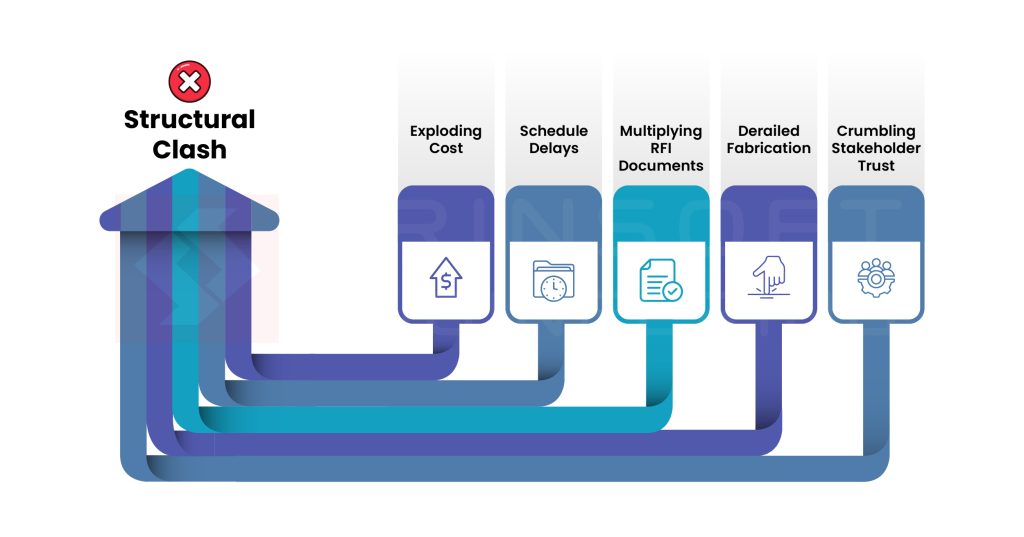
When structural models don’t land right, the cascade effect is brutal:
- Rework costs explode
- Schedule impact hits the critical path
- RFIs multiply like wildfire
- Fabrication and procurement get derailed
- Onsite install errors spike
- Trust collapses across stakeholders
If you’re evaluating whether to implement structural BIM or trying to improve how your team uses it, this guide breaks down what actually works.
The Top Fears Holding Back BIM Implementation
1. “It’ll blow up my schedule.”
Fear: BIM adoption will slow down active projects because teams must learn new tools, new workflows, and new coordination routines.
Why it feels real:
- Teams already firefighting daily issues don’t want another “system” to deal with.
- Early BIM stages (LOD setup, modeling standards, clash rules) can look like added preconstruction time.
- Fear that consultants or subs won’t keep up, causing delays instead of preventing them.
Reality: Once workflows mature, BIM compresses schedules
2. “It’s too expensive, and the ROI is not clear.”
Fear: Licensing, hardware upgrades, training, and potential hiring of BIM coordinators feel like a heavy upfront cost.
Why it feels real:
- Owners don’t always pay more for BIM deliverables.
- Subs may not model or may dump the responsibility back on the GC.
- ROI shows up in fewer RFIs, fewer reworks, and smoother sequencing—but that’s harder to quantify before doing it.
Reality: The investment is front-loaded, but the efficiencies show up fast and consistently across projects.
3. “If the model is wrong, I get blamed.”
Fear: Liability shifts—from drawings to models.
Why it feels real:
- Who “owns” the model? Architect? GC? Subs?
- If a coordinated model misses a clash, does the GC absorb the cost?
- Version control and LOD mismatch between trades can become a legal minefield.
- Many contracts aren’t fully adapted for model-based coordination.
Reality: With proper standards and version control, model-based workflows de-risk construction instead of adding new liabilities.
Documentation & Detailing
Once your structural design is validated, the model generates everything else: rebar schedules, connection details, erection sequences, and fabrication drawings.
The difference is in the workflow. instead of drafting each detail manually, you’re defining rules and standards once. “All W-shape beam-to-column connections use this detail family” or “Rebar spacing follows ACI 318 requirements.” The model applies these rules consistently across thousands of elements.
When the structural engineer revises a column size, every drawing sheet referencing that column updates. No more tracking down which detail sheets need revision.
Coordination & Quality Control
This is where structural BIM pays for itself. You’re running clash detection before the steel fabricator finds conflicts in the field, before the MEP contractor prices change orders, before anyone mobilizes equipment.

But effective coordination is more than just running Navisworks or IntelliClash and generating a clash report. It’s about prioritizing real constructability issues over false positives, establishing clear resolution workflows, and maintaining model discipline.
The Tools You Need
Core Platforms
Revit Structure keeps the structural model tightly connected with architecture and MEP. When the architect shifts a wall, lowers a floor level, or changes a room layout, the structural model updates with it. And since MEP is on the same platform, clashes show up early.
Tekla Structures is what you pick when you need fabrication-level accuracy, not just a design model. It excels at the kind of detail that ends up directly in the workshop — things like complex steel connections, bolt assemblies, welds, embeds, rebar cages, and precast components.
Navisworks handles coordination and clash detection across disciplines. It’s not flashy, but it’s reliable for federating models and managing issue tracking.
Quality Control & Automation Layer
BIMDeX addresses a gap most structural BIM workflows have automated drawing analysis and error detection in 2D structural sheets. While your 3D model might be coordinated, fabrication drawings and construction documents still need validation – checking for dimensioning conflicts, missing details, specification inconsistencies. BIMDeX uses AI to catch these issues automatically, which matters when you’re reviewing hundreds of structural sheets under deadline pressure. It’s particularly valuable for teams managing high drawing volumes or outsourcing structural detailing where manual QA becomes a bottleneck.
The “best” tool is the one your team will actually use consistently, that integrates with your existing workflow, and that your project partners can work with.
What You Get: The Outcomes and Benefits
Design Quality:
- Reduced RFI volume, thanks to early detection of design scope gaps
- Improved constructability, with details validated via 4D/5D-enabled simulations
- Higher documentation accuracy, as sheet sets pull directly from the federated model
Time Efficiency
- Shorter coordination cycles through automated clash runs and issue tracking
- Faster quantity extraction, thanks to model-linked QTO and cost assemblies
- Higher schedule certainty, with 4D simulations identifying phasing bottlenecks early
Construction Readiness
- Fewer field conflicts, thanks to discipline models coordinated in the federated environment
- Installation certainty, with shop-drawings, spool sheets, and fabrication content derived directly from the model
- Clear trade handoffs, supported by 4D sequencing, logistics models, and defined work zones
Making It Work: Implementation Reality
Start Smart
Pick a pilot project that’s complex enough to matter but not so critical that you can’t afford learning curves. Mid-sized projects with supportive project teams work best. Avoid starting with your largest, most complicated project or your fastest-track deadline nightmare.
What makes a good pilot? Look for projects with collaborative owners, experienced subs, and at least 60 days of preconstruction time
Your BIM Execution Plan doesn’t need to be a 200-page document. Focus on what actually matters: Level of Development by phase, coordination meeting frequency, clash tolerance thresholds, and model validation responsibilities. Two pages of clear expectations beats fifty pages nobody reads.
Build or Buy?
In-house capacity makes sense when: You have consistent project volume, need control over modeling standards, or structural BIM is a competitive differentiator for your firm.
Outsourcing works when: Project demand is variable, you need to scale quickly without hiring, or you need specialized expertise (complex steel connections, precast detailing) that doesn’t justify full-time staff.
The tools and strategy are only half the battle. The real challenge is execution, and that’s where many firms turn to specialized BIM outsourcing partners to bridge the gap.
Common Implementation Challenges (And How We Address Them)
The data exchange problem:
BIM models and analytical models often break on transfer—misaligned geometry, missing metadata, failed round-tripping
- We set up clear, contract-driven handoff protocols between your engineers and our modeling teams
- We define ownership: who creates, who modifies, who validates each dataset
- We perform controlled import/export cycles with exchange validation reports
- We maintain interoperability workflows (IFC, Revit ↔ Tekla, Revit ↔ STAAD) so models stay synced
The Skill Gap Issue
The issue: Your strongest structural or MEP engineers aren’t necessarily expert BIM modelers, and shouldn’t have to be
- We supply dedicated BIM modelers, detailers, and coordinators
- We maintain a two-layer QA/QC review (engineer intent → model accuracy)
The standards vacuum
Without unified BIM standards, every consultant, sub, and vendor produces models differently
- We create BEPs, modeling guides, templates, and naming conventions tailored to your firm or project
- Runs model audits using automation to enforce compliance
- We work within your preferred coordinate system, LOD matrix, and file structure
The validation gap
Models drift from real-world intent when they’re not continuously checked—leading to clashes, rework, and late-stage surprises.
- We perform weekly (or milestone-based) model validation and clash analysis as part of ongoing coordination
- We provide structured issue logs with owner, priority, and resolution path
- We ensure every model package is “site-ready” before it hits your field teams
Your Next Move
If you’re done fighting coordination issues and capacity constraints, SrinSoft plugs in instantly, bringing the BIM talent, standards, and processes your team shouldn’t have to build from scratch.
And the way a spotlight reveals the lead before the music hits, we bring clarity to the structure early.
You’re holding the key to the cell; the only question is when you decide to use it.
Unsure where to start? Schedule a consultation with our BIM experts to map out your pilot project!
Tl;DR
✔️ Structural BIM turns your building’s skeleton into a living, thinking model.
✔️ It kills the usual villains: clashes, rework, RFIs, and schedule pain.
✔️ What breaks it? Messy data, uneven skills, no rules, no checks.
✔️ What fixes it? Clear playbooks, pro modelers, tight QA, weekly discipline.
✔️ The toolkit: Revit for brains, Tekla for muscle, Navisworks for peacekeeping, BIMDeX for catching ghosts.